Step-by-step guide
How to Make a 58th Floor AI Video
Quick answer
- 1Choose two clear photosOne person per photo, face clearly visible, in good light.
- 2Decide who takes the versePhoto 1 stands on the left and finishes the hook; photo 2 stands on the right, turns in and takes the verse. Tap Swap sides to switch them before you continue.
- 3Make the 14-second videoChoose how many takes and pay once to get a 14-second 9:16 video of both of you in the trend's four shots. Usually ready in about five minutes. Queue time can vary.
- 4Add the sound at 0:26.8 and postSave the MP4. It's silent: add “original sound - COLORS” in TikTok, tap Adjust and start it at 0:26.8 — every mouth move is timed to it. Turn on the AI-generated label before posting.
From $9.99 · one-time payment · no account
Photos deleted after 30 days
The 58th Floor AI trend puts two people in a seamless teal studio with one microphone hanging between them, trading the hook and the verse of Anderson .Paak and Cordae's “58th Floor”: one finishes the hook, the other turns in and takes the verse. Here's how to make one well, from choosing photos to posting it with the sound at 0:26.8.
1. Pick the right photos
The studio, light, shots and moves are the same in every video, so your two photos decide how good the result looks. Two decent, similar photos beat one great photo and one bad one.
One clear person per photo
Crop out anyone else. The person should fill a good part of the frame.
A clear, sharp face
No sunglasses, masks, hands or hair covering the face. The right person gets a big close-up.
Good, even light
Daylight from a window works well. Avoid backlight and night shots.
The top you want to wear
Each person keeps the top from their own photo, so pick the outfit you want on stage.
Avoid
- Group shots — the tool can't pick one person out of a crowd
- Dark or grainy photos
- Tiny faces (far-away or full-body shots)
- Heavy filters, face-edit apps or strong makeup effects
- Caps, sunglasses or headphones you don't want in the video
2. Decide who takes the verse
Photo 1
Left · finishes the hook
Photo 2
Right · takes the verse
The left person raps for the first five seconds; the right person turns in, takes over and has the rest — including the close-up. Give the verse to whoever should steal the show. Uploaded them the other way round? Tap ⇄ Swap sides before you generate; a finished video can't be flipped.
The four shots
- 0:00sound 0:26.8Two-shot. Both of you from the thighs up. Left finishes the hook; right listens, nods, turns in and starts the verse at 0:05.
- 0:05.5sound 0:32.4Close-up. Right alone, the hanging mic at the edge of the frame. The face shot — pick your sharpest photo for the right.
- 0:08.7sound 0:35.5Wide. Both of you head to toe on the teal stage, right rapping at left.
- 0:11.5sound 0:38.3Face-off. Back to the two-shot, face to face, right rapping at left until the line ends.
3. Ways to make the trend
There are three common routes. Pick the one that fits your time and how close to the trend you want it.
58th Floor AI (one click)
Good for: Upload two photos and get a finished 14-second 9:16 clip in the trend's own shots, timed to the TikTok sound. No prompting, no editing, pay per video.
Keep in mind: One part of the song only: the hook-to-verse handoff. You can't pick the lyrics or moves, and it's always exactly two people.
Film it yourself
Good for: You have a teal wall, a hanging mic and a friend who knows the words. It's the most authentic version.
Keep in mind: You need a matching set, two cameras or a lot of takes, and both of you need the verse down — it's fast and explicit.
Motion-transfer or template apps
Good for: Apps that copy movement from a video you pick onto your photos.
Keep in mind: Results vary with two people and four cuts: the most common problems are shots that don't match the trend and mouths that drift off the sound.
4. Generate and wait
- With both photos in, tap Generate.
- If you don't have a video left, choose a pack — one-time payment, no subscription, no account.
- Your result page opens. Usually ready in about five minutes. Queue time can vary. You can close it — we email you when your video is ready.
- Download the 14-second 9:16 MP4. There's no watermark.
Every generation is a new take, so two videos from the same photos won't be identical; the shots, moves and timing stay the trend's.
Real output
What you'll get
An unedited 14-second, 9:16 clip from the generator above. The people in this sample are AI-generated.
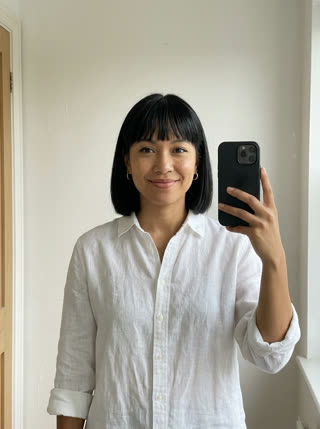
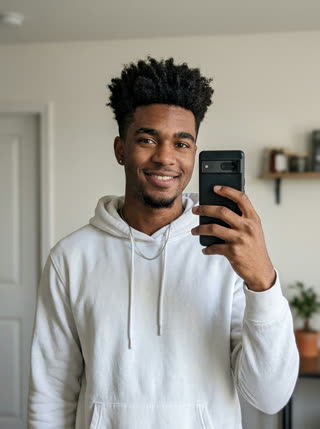 2 photos in
5. Add the sound at 0:26.8
Your clip is silent on purpose: add TikTok's “original sound - COLORS” starting at 0:26.8 and every mouth move lines up with it.
The 58th Floor sound, “original sound - COLORS”, lives in TikTok's own library. Adding it there when you post links your video to the trend and keeps it clear of copyright blocks.
On TikTok
- Upload the MP4 and tap Add sound.
- In TikTok tap Add sound and pick “original sound - COLORS” (or tap the sound on any 58th Floor video, then Use this sound), then tap Adjust and start it at 0:26.8.
- Under More options, turn on the AI-generated content label, then post.
Instagram Reels or CapCut: add the same audio and trim its start to 0:26.8; your video has no audio to turn down.
Some sounds aren't available in every region or to business accounts. If you can't find it, open any 58th Floor video and tap its sound to use it.
Troubleshooting
- The mouths don't match the sound
- The sound starts at the wrong point. In TikTok tap the sound, then Adjust, and start it at 0:26.8 — not at 0:00. The first line you hear should be the left person's.
- The face doesn't look right
- Likeness comes from the photo. Use a sharper, front-facing photo where the face is larger in the frame, with no sunglasses or filters, and make a new take. If the two people are mixed up, tap “Needs work” under the video.
- The wrong person has the verse
- Photo 2, on the right, always takes the verse. Before generating, tap Swap sides — no re-upload needed. A finished video can't be flipped.
- The photo is dark or low quality
- Retake it facing a window in daylight, or pick a different photo. Very small images are rejected at upload. Avoid screenshots and photos that have been compressed many times in chats.
- The generation failed
- A failed generation returns its video credit automatically, so you can try again. A photo that gets flagged by the safety check fails the same way — try a different one.
FAQ
How long is a 58th Floor AI video?
+
14 seconds, as a vertical 9:16 MP4 with no watermark — the hook-to-verse handoff, ending on the end of a line.
Where does the 58th Floor sound start?
+
At 0:26.8 of “original sound - COLORS”. Your clip starts on the trend's cut at that moment, so the left person's last hook lines, the turn and the right person's verse all land on the sound.
Can I use one photo with both people in it?
+
No. Each person needs their own photo: photo 1 becomes the left performer and photo 2 the right. Group photos aren't supported.
How long does it take to generate?
+
Usually ready in about five minutes. Queue time can vary. You can close the page — we email you when it's ready.
Can I do the 58th Floor trend by myself?
+
It's a two-person format, so you need two photos. You can use two different photos of yourself if you want to rap both parts.
Can I use a photo of my pet?
+
We haven't tested pets on this trend yet and can't promise a good result. For now it works best with two people.
Do I have to label it as AI on TikTok?
+
Yes. TikTok requires creators to label realistic AI-generated video. Turn on the AI-generated content setting under More options before posting.
Updated .